> ## Documentation Index
> Fetch the complete documentation index at: https://cybernauts.mintlify.site/llms.txt
> Use this file to discover all available pages before exploring further.
# Email Agent Setup
> Configure your AI email worker for cold outreach.
The **Email Agent** is your primary tool for B2B outreach. It doesn't just send templates; it uses AI to personalize the message for every single lead.
## Configuration
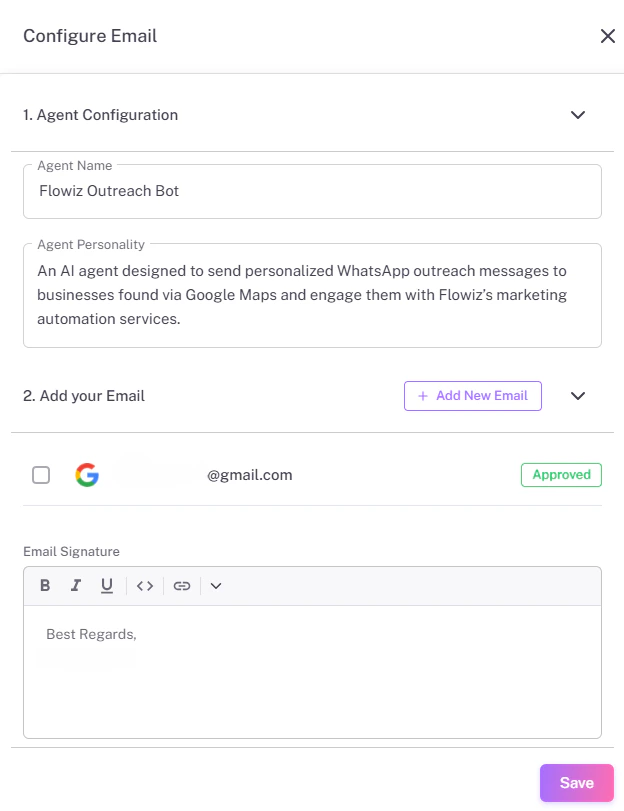
To set up the agent, click the **Settings (Gear)** icon next to the Email Agent card.
{/* Save as 'email-config.png' */}
 ### Key Settings
1. **Agent Personality:**
Describe how the bot should sound.
* *Example:* "You are a helpful sales assistant named Sarah. Be professional but brief."
2. **Daily Limit:**
We recommend starting with **50 emails/day** for a new account to avoid spam filters.
3. **Signature:**
Paste your standard HTML or text signature here.
## Connecting Your Account
Flowiz supports SMTP connections. You will need:
* **SMTP Host:** (e.g., `smtp.gmail.com`)
* **Port:** (Usually `587` or `465`)
* **App Password:** If using Gmail, you must generate an "App Password," not your normal login password.
**Spam Compliance:** Always include an "Unsubscribe" text in your footer to comply with regulations.
### Key Settings
1. **Agent Personality:**
Describe how the bot should sound.
* *Example:* "You are a helpful sales assistant named Sarah. Be professional but brief."
2. **Daily Limit:**
We recommend starting with **50 emails/day** for a new account to avoid spam filters.
3. **Signature:**
Paste your standard HTML or text signature here.
## Connecting Your Account
Flowiz supports SMTP connections. You will need:
* **SMTP Host:** (e.g., `smtp.gmail.com`)
* **Port:** (Usually `587` or `465`)
* **App Password:** If using Gmail, you must generate an "App Password," not your normal login password.
**Spam Compliance:** Always include an "Unsubscribe" text in your footer to comply with regulations.